Staff Field App
This mobile app is designed for real-time tracking, used by field workers and staff on the job. It can be added into the Titan platform allowing you to monitor the location of users alongside other devices within your account. Once the application has been installed, you may refer to the instructions below on how to set up your staff app.
Set up the staff field app
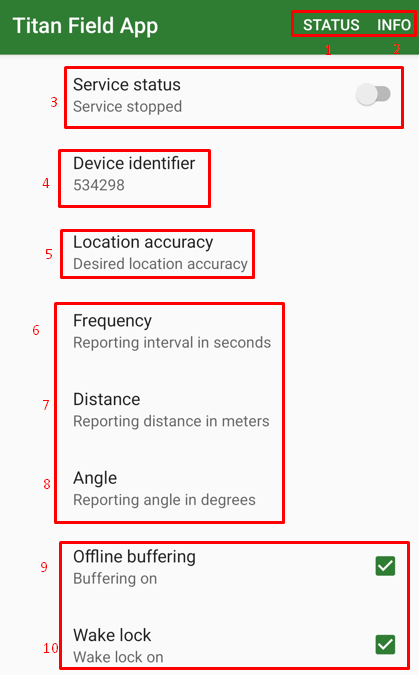
-
Status - displays the current status of the app, including updates on disconnections, location, and other relevant information.
-
Info - contains instructions how to set the settings of the app.
-
Service status - enables and disables tracking.
-
Device identifier - this ID must be input into the platform to add the device.
-
Location accuracy - determines how precise the location data is when the device tracks or updates its position.
-
Frequency - uploads data on the interval period (seconds).
-
Distance - set distance (meters) required before the location updates when moving.
-
Angle - set an angle (degrees) required before the location updates.
-
Offline buffering - stores data locally when it is not connected to the internet or the server.
-
Wake lock - keeps the device's screen or system active, preventing it from going into sleep or power-saving mode.
The recommended settings for items 5-8 are as follows:
Location Accuracy = Medium
Frequency = 600
Distance = 100
Angle = 0
IMPORTANT
Make sure you allow the app to work in the background and remove any battery optimization for this app on the phone.
END OF DOCUMENT